Garmin Connect. One binary.

Garmin
Connect
in your terminal

gccli is a fast, script-friendly CLI for Garmin Connect — activities, health data, workouts, body composition, devices, gear, goals, badges, and more. JSON output and secure credential storage built in.

Activities Health Workouts Body Devices Gear Goals Badges Training Hydration Wellness Profile

Tip: gccli auth login saves your email as the default account automatically.

gccli — terminal
$ gccli auth login you@example.com
$ gccli activities list --limit 5
$ gccli health summary today
$ gccli --json body weigh-ins --start 2024-01-01 --end 2024-06-30
$ gccli workouts create "Easy Run" --type run --step "warmup:5m"
Output
tables / --json
Accounts
multi-account
Secrets
OS keyring
Resilience
retry + CB

Install

Install via Homebrew or build from source.

Homebrew (macOS / Linux)

brew install bpauli/tap/gccli

Build from source

git clone https://github.com/bpauli/gccli.git
cd gccli
make build
./bin/gccli --help

Development

make tools    # Install dev tools
make test     # Unit tests + race
make lint     # golangci-lint
make fmt      # goimports + gofumpt
make ci       # Full CI gate

Quickstart

Authenticate once via browser or headless, then start querying your Garmin data.

1

Log in via browser SSO

Opens your browser for Garmin SSO. Tokens are stored in your system keyring.

gccli auth login you@example.com
2

Or log in headless

For servers or CI. Supports MFA.

gccli auth login you@example.com --headless
gccli auth login you@example.com --headless --mfa-code 123456
3

Start using

Login saves your default account automatically. Check auth status and fetch your recent activities.

gccli auth status
gccli activities list --limit 5
🔑

Keyring backends

Defaults to auto-detect. Force with GCCLI_KEYRING_BACKEND: keychain (macOS), secret-service (Linux D-Bus), or file (encrypted fallback).

Features

Comprehensive Garmin Connect coverage with consistent CLI patterns and clean output.

🏃

Activities

List, search, view details, splits, weather, HR/power zones. Download FIT/GPX/TCX/KML/CSV. Upload, create, rename, retype, delete.

Health Data

Steps, heart rate, sleep, stress, HRV, SpO2, respiration, body battery, floors, training readiness, VO2max, fitness age, race predictions.

💪

Workouts

Create with pace/HR/power/cadence targets, schedule to calendar, download as FIT, upload from JSON. Running, cycling, strength, and more.

Body Composition

Weight tracking, body fat, muscle mass, weigh-in history, blood pressure. Add entries and upload via FIT encoding.

Devices

List registered devices, view settings, solar data, alarms. Query primary and last-used device.

👟

Gear

List gear, usage stats, linked activities, defaults per activity type. Link and unlink gear to activities.

🎯

Goals & Badges

Active goals, earned/available/in-progress badges, challenges, and personal records.

📅

Training Plans

Browse and view training plans from the Garmin training catalog.

💧

Hydration

View and log daily water intake. Track hydration by date.

🌿

Wellness

Menstrual cycle tracking, menstrual summaries, and pregnancy summary data.

👤

Profile

View user profile information and account settings.

🔄

Resilient Networking

Auto-retry on 429/5xx with exponential backoff, circuit breaker, and automatic OAuth2 token refresh on 401.

Commands

Click a group to expand. Every command supports --json, --plain, and --help.

Authentication

gccli auth login <email>
Log in via browser SSO
gccli auth login <email> --headless
Log in via email/password
gccli auth login <email> --headless --mfa-code <code>
Log in with MFA
gccli auth status
Show auth state and token expiry
gccli auth token
Print OAuth2 access token
gccli auth remove
Remove stored credentials

Activities

gccli activities list --limit 20 --start 0
List recent activities
gccli activities list --type running
Filter by activity type
gccli activities count
Total activity count
gccli activities search --start-date ... --end-date ...
Search by date range
gccli activity summary <id>
Activity summary
gccli activity details <id>
Full activity details
gccli activity splits <id>
Activity split data
gccli activity weather <id>
Weather during activity
gccli activity hr-zones <id>
Heart rate zone breakdown
gccli activity download <id> --format fit
Download as FIT/GPX/TCX/KML/CSV
gccli activity upload ./activity.fit
Upload a FIT file
gccli activity create --name "Run" --type running --duration 30m
Create manual activity entry
gccli activity rename <id> "New Name"
Rename an activity
gccli activity delete <id> --force
Delete an activity

Health Data

gccli health summary [date]
Daily health summary
gccli health steps [date]
Step chart for a day
gccli health steps daily --start ... --end ...
Daily step totals in a range
gccli health hr [date]
Heart rate data
gccli health rhr [date]
Resting heart rate
gccli health sleep [date]
Sleep data
gccli health stress [date]
Stress scores
gccli health hrv [date]
Heart rate variability
gccli health spo2 [date]
Blood oxygen saturation
gccli health body-battery [date]
Body battery levels
gccli health respiration [date]
Respiration rate
gccli health floors [date]
Floors climbed
gccli health training-readiness [date]
Training readiness score
gccli health training-status [date]
Training status
gccli health fitness-age [date]
Fitness age estimate
gccli health max-metrics [date]
VO2max and performance metrics
gccli health race-predictions
Race time predictions
gccli health endurance-score [date]
Endurance score
gccli health hill-score [date]
Hill score
gccli health intensity-minutes [date]
Intensity minutes
gccli health lactate-threshold
Lactate threshold
gccli health cycling-ftp
Cycling FTP

Body Composition

gccli body composition
Today's body composition
gccli body composition --start ... --end ...
Body composition over a date range
gccli body weigh-ins --start ... --end ...
Weigh-in history
gccli body add-weight 75.5 --unit kg
Log a weight entry
gccli body add-composition 75.5 --body-fat 15.2 --muscle-mass 35.0
Log full body composition
gccli body blood-pressure --start ... --end ...
Blood pressure history
gccli body add-blood-pressure --systolic 120 --diastolic 80
Log blood pressure
gccli body delete-weight <pk> --date ...
Delete a weight entry

Workouts

gccli workouts list --limit 20
List saved workouts
gccli workouts detail <id>
View workout details
gccli workouts download <id> --output workout.fit
Download workout as FIT
gccli workouts upload ./workout.json
Upload workout from JSON
gccli workouts create "Name" --type run --step "warmup:5m" ...
Create with pace/HR/power targets
gccli workouts schedule <id> <YYYY-MM-DD>
Schedule workout on a date
gccli workouts delete <id>
Delete a workout

Devices

gccli devices list
List registered devices
gccli devices settings <device-id>
View device settings
gccli devices primary
Show primary device
gccli devices last-used
Show last-used device
gccli devices alarms
List device alarms
gccli devices solar <device-id> --start ... --end ...
Solar charging data

Gear

gccli gear list
List all gear
gccli gear stats <uuid>
Gear usage statistics
gccli gear activities <uuid> --limit 20
Activities linked to gear
gccli gear defaults
Default gear per activity type
gccli gear link <uuid> <activity-id>
Link gear to activity
gccli gear unlink <uuid> <activity-id>
Unlink gear from activity

Goals, Badges & Challenges

gccli goals list
List all goals
gccli goals list --status active
Filter by goal status
gccli badges earned
Earned badges
gccli badges available
Available badges
gccli badges in-progress
In-progress badges
gccli challenges list
Active challenges
gccli records
Personal records

Hydration, Profile, Training & Wellness

gccli hydration [date]
View hydration data
gccli hydration add 500
Log 500ml of water
gccli profile
User profile
gccli profile settings
Account settings
gccli training plans --locale en
Browse training plans
gccli training plan <id>
View a training plan
gccli wellness menstrual-cycle --start-date ... --end-date ...
Menstrual cycle data
gccli wellness pregnancy-summary
Pregnancy summary
gccli reload [date]
Reload data for a date

Configuration

Environment variables, config file, and global flags.

Environment Variables

VariableDescription
GCCLI_ACCOUNTDefault account email (overrides config file default)
GCCLI_DOMAINGarmin domain (garmin.com or garmin.cn)
GCCLI_JSONEnable JSON output (1, true, yes)
GCCLI_PLAINEnable plain/TSV output
GCCLI_COLORColor mode: auto, always, never
GCCLI_KEYRING_BACKENDKeyring: keychain, secret-service, file

Global Flags

FlagDescription
--account <email>Account to use (overrides GCCLI_ACCOUNT and config default)
--json, -jOutput JSON to stdout
--plainOutput stable TSV to stdout
--color <mode>Color mode: auto, always, never
--versionPrint version information
--helpShow help for any command
📄

Config file

macOS: ~/Library/Application Support/gccli/config.json
Linux: ~/.config/gccli/config.json

{
  "keyring_backend": "file",
  "domain": "garmin.com"
}

Date Formats

FormatExampleDescription
YYYY-MM-DD2024-06-15Explicit date
todayToday's date
yesterdayYesterday's date
Nd3d, 7dN days ago

Examples

Real-world scripts and one-liners you'll use daily.

Export all runs from the last month

Fetch running activities and download each as GPX.

gccli --json activities search \
  --start-date 2024-05-15 --end-date 2024-06-15 \
  --limit 100 | \
  jq -r '.[] | select(.activityType.typeKey == "running") | .activityId' | \
  while read id; do
    gccli activity download "$id" --format gpx --output "run_${id}.gpx"
  done

Daily health dashboard

Pull today's key metrics into a JSON summary.

gccli --json health summary | jq '{
  steps: .totalSteps,
  calories: .totalKilocalories,
  distance_km: (.totalDistanceMeters / 1000),
  active_minutes: .moderateIntensityMinutes + .vigorousIntensityMinutes
}'

Track weight over time

Export weigh-in data as tab-separated values.

gccli --json body weigh-ins \
  --start 2024-01-01 --end 2024-06-30 | \
  jq -r '.dailyWeightSummaries[] | [.summaryDate, .weight.value] | @tsv'

Download the latest activity

One-liner to grab your most recent activity.

latest=$(gccli --json activities list --limit 1 | jq -r '.[0].activityId')
gccli activity download "$latest" --format fit

Create a structured running workout

Warmup, pace intervals, and cooldown.

gccli workouts create "Tempo 30min" --type run \
  --step "warmup:5m@pace:5:30-6:00" \
  --step "run:20m@pace:5:00-5:30" \
  --step "cooldown:5m"

Cycling with power targets

FTP interval workout for the bike.

gccli workouts create "FTP Intervals" --type bike \
  --step "warmup:10m" \
  --step "run:5m@power:250-280" \
  --step "recovery:3m" \
  --step "run:5m@power:250-280" \
  --step "cooldown:10m"

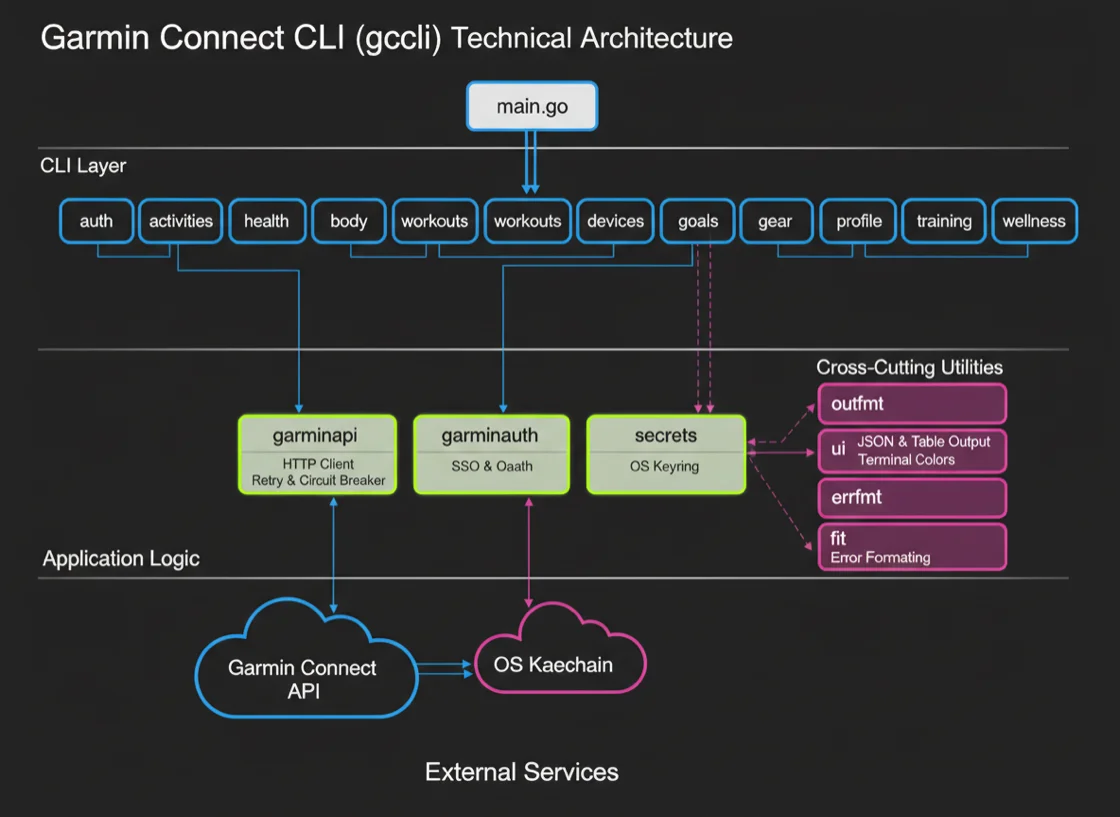
Architecture

Clean layered design with function-variable DI and context-based injection.

cmd/gccli/main.go internal/cmd/ internal/garminapi/ internal/garminauth/

internal/cmd/

Kong-based CLI commands. Each command is a struct with Run(g *Globals) error.

internal/garminapi/

HTTP client returning json.RawMessage. RetryTransport + CircuitBreaker.

internal/garminauth/

SSO auth: browser + headless login, OAuth1→OAuth2 exchange, MFA.

internal/secrets/

OS keyring abstraction. macOS Keychain, Linux Secret Service, file fallback.

internal/config/

Config file paths and environment variable overrides.

internal/outfmt/

Output formatting: JSON, Table, and Plain/TSV modes via context.

internal/ui/

Terminal UI with colors and prompts via termenv.

internal/fit/

FIT file binary encoding for weight and body composition uploads.

🖼
Architecture diagram — coming soon